
BlackPlayer EX
FifthSourceMusic & Audio
2.22.55K Reviews
- Version
- 20.65
- Installs
- 100.00K
- Age Rating
- Everyone
Screenshots
Our Review of BlackPlayer EX
 Analysis by Appyee
I approach any music player with a simple question: does it make the music I already own easier to enjoy, or does it get in the way? BlackPlayer EX is an Android music app from FifthSource, aimed at people who want to shape both the listening experience and the way their library looks. It is a paid app at $3.49, rated for Everyone, and its long history gives it a different feel from a new streaming service: the focus is on playing and organizing personal audio rather than discovering a subscription catalogue.
What trust looks like in a local music player
That distinction matters when deciding how much of your listening life to put into an app. A local-library player can be a practical choice if you keep music files on your device and prefer to manage them yourself. It also means the useful questions are concrete: what controls does the app expose, how does it handle the library you choose to play, and does its interface make those choices understandable? I would not treat a polished design or a paid price as proof of a particular privacy practice; I’d judge the app by the controls I can actually see and use.
BlackPlayer EX has an average rating of 2.2 from around 27,000 ratings, alongside roughly 2,500 written reviews. That is a notably mixed reception, so I wouldn’t recommend buying it on reputation alone. The rating is a reason to read recent user feedback and think about your own priorities, not a substitute for trying the app with your library. It has passed 100,000 installs, but popularity by itself does not settle whether its approach will suit you.
Unleashing the Power of Customization
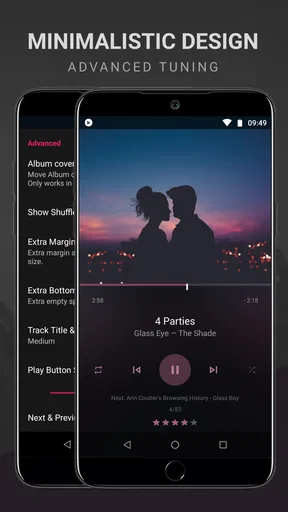
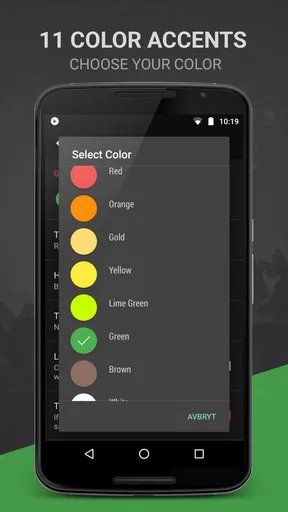
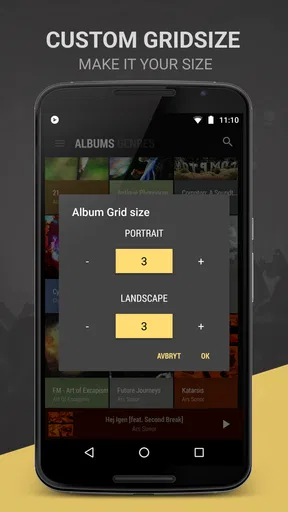
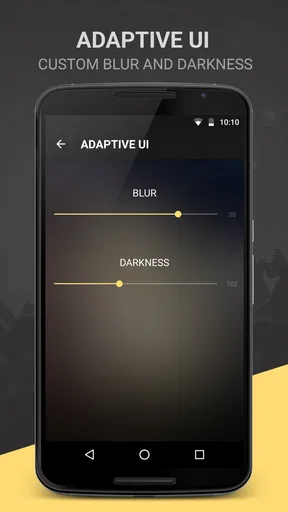
One of the first things you'll notice about BlackPlayer EX is the level of customization it offers. Seriously, it’s like having a music player that you can tailor to your personal taste. From themes to widgets, you can tweak almost every aspect of its interface. Whether you’re into a sleek, minimal look or something a little more colorful, this app has you covered.
The app’s interface is smooth and easy to navigate. You can swipe through your library effortlessly, and the animations are quite pleasing to the eye. I particularly enjoy the customizable themes that let you change the look and feel of the app. It's not just about aesthetics, though; these customizations enhance the overall user experience.
Verified controls and daily choices
On the practical side, the controls I can point to are the ones visible in the player: playback, library organization, playlists, tag editing, the sleep timer, and the adjustable appearance. Those give you direct ways to shape a listening session and keep a collection tidy. I would not confuse that with a complete account or privacy dashboard. If you are choosing a music app mainly to manage cloud syncing, family accounts, or detailed data controls, a service built around those needs may be a better fit.
A useful habit with a customizable player is to change one thing at a time. I’d begin with the library view and a comfortable theme, then adjust sound settings only after listening to a familiar track. That makes it easier to tell whether a change genuinely helps or merely makes the screen feel new. It also avoids spending the first session rearranging the interface before you have confirmed that your albums and playlists behave the way you expect.
Sound, formats, and careful adjustments
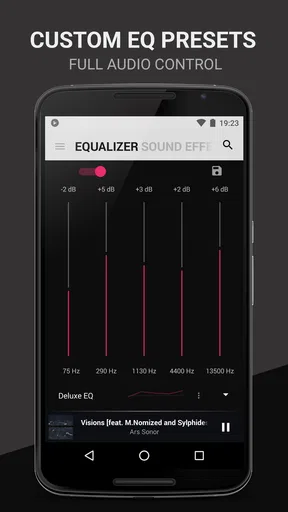
If you’re a stickler for sound quality like I am, then you'll appreciate the powerful equalizer that comes with BlackPlayer EX. The app supports a ton of audio formats, ensuring that your music sounds just the way you want it. I spent hours playing with the equalizer settings, adjusting the bass and treble until my tunes hit just right.
The app also supports FLAC, which is fantastic if you’ve got a collection of high-quality audio files. Honestly, the sound quality is one of the standout features for me. It’s like having a mini sound system in your pocket.
Making a local library work for you
For a useful first test, choose a few albums you know well rather than importing your entire collection and judging the app from a crowded screen. Check whether the tracks appear in the order you expect, then try the tag editor on a file whose details you already know. This small workflow helps separate a library-organization issue from a sound preference. If a track is mislabeled, correcting its tags can make later browsing and playlist building less frustrating.
Equalizer changes are another place where a little restraint pays off. I’d compare the same passage at the same listening volume before and after an adjustment; a louder setting can seem better even when it is simply louder. If you switch between headphones and a car stereo, a single favorite curve may not suit both. The value here is having room to tune, not a guarantee that every preset or tweak will improve every recording.
Features That Make It Stand Out
Beyond the basics, BlackPlayer EX offers a range of features that elevate it above the competition. Here’s a quick rundown of some of my favorites:
- Gapless Playback: Say goodbye to awkward pauses between tracks.
- ID3 Tag Editor: Edit your music tags directly from the app.
- Sleep Timer: Perfect for those who like to fall asleep to their tunes.
Another feature that I find incredibly useful is the option to sort and manage your playlists with ease. You can create playlists on the fly, and organizing them is a breeze. Plus, the app automatically imports your existing playlists, which is a huge time saver.
Small workflows that save effort
Gapless playback is most useful when the order and transitions matter, such as a live recording or an album designed to run continuously. For shuffled background listening, it may make little difference, so I wouldn’t treat it as a reason on its own to switch players. The sleep timer has a different everyday benefit: I can start an album at bedtime without needing to remember to stop playback later. Before relying on it as part of a nightly routine, I’d test the timer once while awake so its behavior is familiar.
Playlist importing can make the move from another player less tedious, but it is still worth checking a few entries after the import. A playlist is only useful if it points to the tracks you expect, especially when a collection has been renamed or reorganized. I’d use the tag editor selectively rather than attempting a sweeping cleanup on the first day: fix obvious errors as they appear, then see whether the library becomes easier to browse.
Who will appreciate the trade-offs
This is a stronger match for someone who already has a music collection, enjoys adjusting an interface, and wants playback tools without making streaming discovery the center of the experience. It can also suit a listener who keeps different playlists for commuting, exercise, or winding down, since the app combines library handling with quick playlist creation and a sleep timer. If you mainly want a service to recommend unfamiliar artists, keep a cloud library synchronized across devices, or make listening effortless with almost no setup, a mainstream streaming app is likely more convenient.
The paid price changes the decision, too. At $3.49, I’d want to know that I will use the local-library features rather than pay for customization I rarely touch. The app’s current version is 20.65, and it runs on Android 5.0 or later, so it is aimed at Android users rather than people looking for one music player across Android and iOS. It was released on January 20, 2014; that history may appeal to someone who values an established player, but it does not guarantee that every current device or personal workflow will feel seamless.
Trust, access, and sensitive moments
Music libraries can reveal habits through the artists and playlists a person keeps close, so I prefer to make deliberate choices about what is stored on a device and what is shared elsewhere. With this app, the useful visible agency is primarily around listening and library management: I can decide what to play, how to arrange playlists, whether to edit tags, and how the player is presented. I would avoid assuming anything beyond those observable choices about permissions, data retention, or account controls. If those details are central to your decision, inspect the current Android permission prompts and the developer’s current privacy information before installing or purchasing.
That is also why I would start with a small, ordinary test rather than immediately rebuilding my full music setup. Add or open a familiar album, check the library display, and try playback with the controls you expect to use. If the app asks for access needed to locate your music, consider whether that request matches what you are trying to do. A request that seems unrelated is a reason to pause and investigate, not to assume the app is unsafe or to grant access automatically.
Why You’ll Love It
Let’s be honest, a music player app is only as good as its ability to deliver music in a way that fits your lifestyle. BlackPlayer EX does just that. It’s got a no-nonsense interface, it’s packed with features, and it doesn’t bombard you with ads. I mean, who doesn’t love an ad-free experience, right?
What really seals the deal for me is the app’s reliability. It doesn’t crash or glitch, which is something I can’t say for all music apps I’ve tried. Plus, the developer is pretty active in terms of updates and improvements, so you know you’re getting a product that evolves with your needs.
Where another player may be the wiser choice
The key comparison is not simply which player has more buttons; it is whether you want a hands-on library or an all-in-one listening service. Streaming apps usually make search, recommendations, and access to a large catalogue their main attraction. BlackPlayer EX is more compelling when your own files are the starting point and you want to shape how they are sorted and heard. A very basic preinstalled player may be easier if all you need is play and pause, while a cross-platform service is the clearer choice if you move between phone ecosystems or rely on synchronized listening.
There is a learning trade-off in the customization as well. The freedom to adjust the interface is satisfying once it reflects your habits, but it can make the first session feel like a setup project. I’d resist changing every visual option at once. Pick a layout you can read comfortably, use the app for a few days, then revisit only the parts that slow you down. If you find yourself tuning screens more than listening, that is a good sign that a simpler player may suit you better.
Final Thoughts
In the vast ocean of music apps, BlackPlayer EX stands out as a gem. It’s flexible, powerful, and designed with the user in mind. Whether you’re a casual listener or a serious audiophile, this app has something to offer. So, if you’re on the hunt for a new music player, give BlackPlayer EX a try. I think you’ll find that it hits all the right notes.
My more cautious recommendation is to choose it for specific reasons: a personal music library, interest in adjusting playback and appearance, or useful habits like bedtime listening and carefully managed playlists. I would hesitate if I wanted recommendations, cloud-first convenience, or clear account and privacy controls to be the deciding feature. The low average rating makes a little research sensible, and the paid price means I’d check recent feedback before committing. For the right Android listener, though, its combination of library tools and customization can make everyday listening feel more personal without turning it into a streaming subscription experience.
Verdict
Strengths of BlackPlayer EX
- Highly customizable interface options.
- Supports a wide range of audio formats.
- Built-in equalizer with sound effects.
- Ad-free experience for uninterrupted listening.
- Offline playback capability.
Limitations of BlackPlayer EX
- No cloud music integration.
- Limited podcast support.
- Occasional UI lag on older devices.
- No social sharing features.
- Lacks lyrics support for all songs.
Similar Picks in This Category
View All
YouTube Music
Google LLC4.4

Samsung Music
Samsung Electronics Co., Ltd.3.8

Spotify: Music and Podcasts
Spotify AB4.3

JioSaavn - Music & Podcasts
Saavn Media Limited4.3

Lark Player:Music Player & MP3
Lark Player Studio - Music, MP3 & Video Player4.6

StarMaker: Sing Karaoke Songs
SKYWORK AI PTE. LTD.4.3
Frequently Asked Questions
What features does BlackPlayer EX offer compared to the free version?
BlackPlayer EX provides a premium experience with additional features such as customizable themes, a built-in equalizer, more fonts, and the ability to manage playlists more effectively. It also offers a better visual experience with custom widgets, album covers, and enhanced sound quality options, making it a worthwhile upgrade for music enthusiasts.
Is BlackPlayer EX compatible with all Android devices?
BlackPlayer EX is compatible with most Android devices running Android 4.1 or later. However, performance may vary based on the device’s specifications. It's recommended to check the app’s compatibility with your specific device in the Google Play Store before purchasing to ensure a smooth experience.
How does BlackPlayer EX handle music organization?
BlackPlayer EX excels in organizing music by allowing users to categorize their library by artists, albums, genres, and playlists. It supports the editing of tags and offers a clean, user-friendly interface to make navigation and music discovery seamless. The app also supports various audio formats, ensuring robust music management.
Can I use BlackPlayer EX offline?
Yes, BlackPlayer EX allows offline playback of your music library. Once your music files are stored on your device, you can listen to them without an internet connection. This makes it an excellent choice for users who prefer offline music listening or when traveling without reliable internet access.
Is there customer support available for BlackPlayer EX users?
Yes, BlackPlayer EX offers customer support via email for any issues or questions users may encounter. The developers are active in releasing updates and improvements based on user feedback. It's recommended to reach out directly through the app’s contact options for prompt assistance or to report any bugs.
